
Updated 11/3/26
Acumatica EDI integration connects Acumatica Cloud ERP to your trading partners’ EDI systems, so purchase orders, acknowledgments, advance ship notices and invoices move in and out of Acumatica automatically instead of being rekeyed. Done well, it gives your team one source of truth for orders, inventory and billing.
Acumatica is a cloud business management solution for small and midmarket organizations, handling orders, fulfillment and financials. It’s especially common among wholesale distributors, who buy in bulk and resell to retailers and e-commerce sellers through a network of trading partners. For them, EDI is how their biggest customers expect to trade. But Acumatica doesn’t speak X12 or EDIFACT on its own, and it doesn’t know each retailer’s mapping rules, testing requirements or compliance penalties. That gap is where most EDI for Acumatica projects succeed or stall.
This guide covers how Acumatica EDI integration works, the core documents, your integration options, the setup and testing steps, compliance and chargebacks, and how to choose between a managed and a DIY approach. It’s written for the consultants and ERP partners who implement Acumatica, and for the operations and IT leaders who live with the results after go-live.
Table of Contents
- What is Acumatica EDI Integration?
- How Acumatica EDI Integration Works: 850, 855, 856 and 810
- Acumatica EDI Integration Options
- How to Integrate EDI with Acumatica ERP: Setup Steps
- Acumatica EDI Compliance and Chargebacks
- How to Choose an Acumatica EDI Provider: Managed vs. DIY
- Getting Acumatica EDI Integration Right
- Talk to an Acumatica EDI Expert
- Frequently Asked Questions About Acumatica EDI Integration
What is Acumatica EDI Integration?
Acumatica EDI integration is the connection that translates trading partner EDI documents into Acumatica records, and Acumatica records back into compliant EDI documents. An inbound 850 purchase order becomes a sales order. A shipment in Acumatica becomes an outbound 856 advance ship notice. An invoice becomes an 810.
Three layers make that work:
- Translation: converting X12 (or EDIFACT) files to and from a format Acumatica can read.
- Mapping: matching each partner’s fields, codes and rules to Acumatica’s customers, items, units of measure, ship-to locations and terms.
- Communication: moving files securely through AS2, SFTP or a VAN, and tracking acknowledgments (997/999).
Where APIs Fit
Acumatica is a cloud ERP built on Microsoft .NET, and it exchanges data with other systems through its web service APIs. EDI and APIs aren’t competitors. EDI is the standard your trading partners require, and APIs are how that EDI data gets in and out of Acumatica. Many transaction flows now run EDI-to-API, which is why APIs are often called the EDI of the modern supply chain.
That’s also why most EDI for Acumatica today is cloud-based. Cloud EDI Acumatica integration exchanges data through Acumatica’s APIs rather than through files dropped on a local server. That keeps the integration outside the ERP’s core, which makes Acumatica upgrades easier.
Why It Matters After Go-Live
If you’re a consultant, you know the pattern. The ERP launches on time, and then the first big retailer sends an order with a ship-to code nobody mapped. Without someone accountable for EDI, those exceptions land on the client’s operations team, and often back on you.
The benefits of EDI for Acumatica are well known:
- Lower operating costs: no printing, paper, postage, filing or manual document retrieval.
- Faster processes: order entry, inventory updates and invoicing happen in minutes, not days.
- Better accuracy: fewer keying errors and cleaner records in Acumatica.
- Stronger security: documents move over secure, tracked connections instead of email and paper, which supports data privacy requirements such as GDPR.
- More business: you can say yes to retailers and distributors that require EDI.
The harder question is who keeps it running once partners change their requirements. A poor integration brings hidden costs, like new partners stuck in an onboarding backlog, and it runs into common EDI integration challenges such as missing data and mismatched systems.
How Acumatica EDI Integration Works: 850, 855, 856 and 810
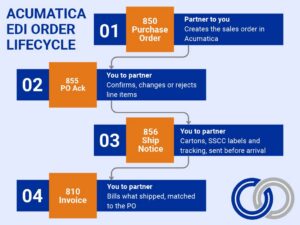
Most Acumatica EDI integration starts with four X12 documents that follow one order from purchase to payment.
850 Purchase Order (Inbound)
The trading partner sends an 850. The EDI layer validates it, applies the partner’s map, and creates a sales order in Acumatica with the right customer, ship-to, items, quantities and prices. If a SKU or ship-to code doesn’t match, the order should stop in an exception queue, not post with bad data.
855 Purchase Order Acknowledgment (Outbound)
The 855 tells the partner which lines you accept, change or reject. Many retailers require it within a set window. It’s generated from the Acumatica sales order once inventory and pricing are confirmed.
856 Advance Ship Notice (Outbound)
The 856 describes exactly what’s in the shipment: cartons, items, quantities, SSCC-18 labels and carrier details. It’s built from Acumatica shipment data and must arrive before the freight does. It’s also the document most often tied to compliance penalties.
810 Invoice (Outbound)
The 810 bills the partner for what shipped. It pulls from the Acumatica invoice and must match the PO and ASN on price, quantity and terms, or payment slows down.
Other Documents You May Need
Depending on your partners, you may also exchange 846 inventory advice, 860 PO changes, 820 remittance advice or 940/945 warehouse documents. Each one adds mapping and testing work, so scope them early.
Acumatica EDI Integration Options
There are three common types of EDI solutions for Acumatica. The right one depends on your document volume, how many trading partners you have, and how much EDI expertise you have in-house.
| Option | How it works | Best fit | Watch for |
|---|---|---|---|
| Web EDI | Staff key or download documents in a web portal; data is rekeyed into Acumatica | A handful of partners and low volume | Manual entry, keying errors, no real ERP integration |
| Connector or API software | EDI software exchanges data with Acumatica through its APIs; your team owns maps, testing and monitoring | Teams with in-house EDI skills and time | Software isn’t the same as support; partner changes and failures land on your staff |
| Managed EDI | A provider integrates through Acumatica’s APIs and owns mapping, onboarding, testing and monitoring | Growing partner lists, retail compliance pressure, lean IT | Check scope, response times and who is accountable when a document fails |
Web EDI
Web EDI is the lowest-cost way to start. It meets a partner’s EDI requirement, but it isn’t an integration: someone still retypes orders into Acumatica and ASNs back out. It tends to break down once volume or partner count grows.
Connectors and API-Based Software
API-based integration exchanges data with Acumatica through its web services instead of custom code inside the ERP. That keeps upgrades cleaner. The trade-off is ownership: someone on your team has to build maps, run partner testing, watch for failed transactions and respond when a retailer changes its spec. We’ll go deeper on API-based vs. embedded approaches in a separate post.
Managed EDI Acumatica Integration
With managed EDI Acumatica integration, a provider runs the EDI side for you. That typically covers integration, mapping, partner onboarding, testing, monitoring and day-to-day support. You still own your business processes and data in Acumatica. The provider owns making sure each document arrives correctly and on time.
GraceBlood’s VelociLink™ Managed EDI takes this approach, with little to no footprint inside the customer’s Acumatica environment.
How to Integrate EDI with Acumatica ERP: Setup Steps
Most Acumatica EDI integration projects follow the same five steps. Skipping the first one is the most common reason projects slip. For a broader view, see how to prepare your business for EDI integration.
1. Settle Business Onboarding First
Before any technical work, agree on the commercial terms with each trading partner: SKUs and UPCs, pack sizes, pricing, ship-to locations, freight terms and payment terms. EDI only automates the rules you’ve already agreed to. If those aren’t defined, mapping and testing will stall.
2. Gather Requirements
- Collect each partner’s EDI implementation guide and the documents it requires.
- Confirm the X12 version and communication method (AS2, SFTP or VAN).
- Review your Acumatica ERP system setup: customers, item cross-references, units of measure, warehouses and order types.
- Decide which steps run automatically and which need human review.
3. Map Documents to Acumatica
Mapping connects each segment in the partner’s spec to a field in Acumatica, in both directions. This is where partner-specific rules live: label formats, required references, allowance and charge codes. Good maps also define what happens when data doesn’t match, so bad orders stop in an exception queue.
4. Run Acumatica EDI Testing
Acumatica EDI testing usually happens in two rounds:
- Internal testing: run sample documents end to end in an Acumatica test or sandbox tenant. Check that orders create correctly, ASNs match shipments and invoices match both.
- Partner certification: send test documents to the trading partner, fix any errors they report, and get sign-off before going live. Some retailers also audit labels and ASN timing.
5. Onboard Partners and Go Live
Move partners to production one at a time, starting with the simplest. Watch the first live orders closely. After go-live, set up monitoring for failed or missing documents, late acknowledgments and any connection outage with a partner, so issues are caught before a partner notices.
Setup Checklist
- Commercial terms agreed with each partner
- Implementation guides collected for every required document
- Acumatica item, customer and ship-to cross-references complete
- Maps built for 850, 855, 856 and 810 (plus any extras)
- Exception handling defined for unmatched data
- Internal testing passed in a test tenant
- Partner certification signed off
- Production monitoring and an owner for each alert
Acumatica EDI Compliance and Chargebacks
Acumatica EDI compliance means meeting each trading partner’s rules for document content, format and timing. Retailers and distributors publish these rules in vendor compliance guides, and many charge back suppliers who miss them. Learn more about why trading partners mandate EDI compliance.
Common triggers include:
- An 856 ASN that arrives late, is missing, or doesn’t match what was received
- Incorrect or unreadable SSCC-18 carton labels
- An 855 not sent within the required window
- 810 invoices with prices or quantities that don’t match the PO
- Missed ship windows or wrong ship-to locations
Most of these start as data problems inside the order-to-cash process, not as EDI problems. A ship-to code that was never mapped, or a pack size that changed in Acumatica but not in the partner’s catalog, shows up later as a penalty.
Preventing Chargebacks
- Validate inbound orders against Acumatica data before they post.
- Generate ASNs from actual shipment and packing data, not planned data.
- Monitor for missing acknowledgments and late documents daily.
- Track chargebacks by partner and reason code, so recurring causes get fixed at the source.
Not every chargeback can be prevented. Some come from partner-side receiving errors or disputed deductions. But consistent monitoring and clean mapping remove most of the repeat offenders. VelociLink™ Analytics gives teams that visibility with real-time dashboards.
How to Choose an Acumatica EDI Provider: Managed vs. DIY
The real choice isn’t which software to buy. It’s who will be responsible for EDI after go-live.
When DIY Can Work
- You have a small, stable set of trading partners.
- Someone on staff knows X12, mapping and partner testing, and has time for it.
- You can absorb the occasional failed document or chargeback while it’s fixed.
When Managed EDI Makes More Sense
- You’re adding retail or distribution partners with strict compliance rules.
- IT is lean, or EDI knowledge sits with one person.
- Partner changes, testing and exceptions are pulling your team away from the business.
- You want one accountable team for integration, mapping, onboarding, testing and monitoring.
Managed EDI isn’t right for everyone. But for most growing Acumatica customers, the cost of owning EDI shows up in staff time and penalties, not on the software invoice.
Questions to Ask Any EDI Provider
- How do you connect to our Acumatica account, and how much do you install inside our ERP?
- Who builds and maintains our maps when a partner changes its spec?
- How do you handle Acumatica EDI testing and partner certification?
- What do you monitor, and how fast do you respond when a document fails?
- Do you have Acumatica experience, and can we talk to a reference?
- What are the contract terms and fees?
For more on evaluating vendors, see What to Look For in a Modern EDI Provider.
For Acumatica Partners and Consultants
If you implement Acumatica, EDI is often the piece that decides whether a go-live feels finished. Partnering with a managed EDI provider lets you scope it clearly, avoid owning ongoing EDI support, and keep the client relationship focused on the ERP. GraceBlood is a recognized partner in the Acumatica ISV (independent software vendor) community, the network of ISV solutions built to extend Acumatica, and works with ERP resellers and consultants through the VelociNetwork™ partner program. Learn more about our Acumatica EDI partnership.
How GraceBlood Runs Acumatica EDI Projects: GADGET™
GraceBlood’s EDI implementation work for Acumatica follows the GADGET™ methodology:
- Gather specs, samples and business information from you and your partners.
- Analyze your current process and define the future state, so there are no surprises.
- Develop maps and the integration for your Acumatica setup.
- Go-live with partners one at a time.
- Evaluate post-launch performance.
- Tune the integration as partners and volumes change.
GADGET™ is built for rapid integrations without skipping steps. Clients using it have gone live up to 50% faster, and 91% credit it as fundamental to project success.
Your Acumatica EDI Team
Every GraceBlood Acumatica EDI project gets a dedicated four-person team, so you always know who’s responsible:
- Business development representative: your first point of contact, who scopes partners, documents and goals.
- Project manager: builds the project plan, organizes resources and keeps the timeline on track.
- Data mapping analyst: maps each document between your trading partners and Acumatica.
- Trading partner liaison: works with your partners on your behalf through testing and onboarding.
Why GraceBlood for Acumatica EDI Integration
- A dedicated four-person team that owns integration, mapping, partner onboarding, testing and monitoring
- API-based integration with little to no footprint inside Acumatica
- A proven implementation process (GADGET™)
- VelociLink™ processes more than $1 billion in transactions annually
- Annual SOC 1 audit
- No long-term contracts, no hidden fees and no payments until you’re live
Getting Acumatica EDI Integration Right
Acumatica gives your business a strong cloud foundation for orders, inventory and financials. EDI is what connects that foundation to the retailers, distributors and suppliers you trade with. When the two work together, orders flow into Acumatica without rekeying, ASNs and invoices go out on time, and your team spends its day running the business instead of chasing documents.
The technology is the easy part. What separates a smooth Acumatica EDI integration from a costly one is everything around it:
- Commercial terms settled with each partner before mapping starts
- Maps that reflect each partner’s rules and stop bad data before it posts
- Acumatica EDI testing that covers both your sandbox and partner certification
- Monitoring that catches a missing ASN or late acknowledgment before it becomes a chargeback
- People who are accountable when a partner changes its spec or a document fails
That last point matters most after go-live. Trading partners update their requirements, you add new customers, and Acumatica itself gets upgraded. An integration that runs through Acumatica’s APIs, with little to no footprint inside the ERP, makes those changes easier. A team that owns the EDI side makes them routine.
A Note for Acumatica Partners and Consultants
Your clients judge the whole project by how it feels three months after go-live. If EDI exceptions land on their operations team, or on you, the ERP gets the blame. Bringing in a managed EDI partner early lets you scope EDI clearly in the project plan, hand off ongoing partner changes and support, and keep your team focused on Acumatica. Through the VelociNetwork™ partner program, GraceBlood works alongside ERP resellers and consultants as an extension of the implementation team.
Talk to an Acumatica EDI Expert
Whether you’re planning a new Acumatica rollout, adding your first EDI trading partner, or fixing a setup that’s costing you time and chargebacks, a short conversation can clarify your options. Our Acumatica EDI experts can help you:
- Review which EDI documents your trading partners require
- Compare managed and DIY approaches for your volume and team
- Map out a realistic timeline for setup, testing and partner onboarding
- Identify the compliance risks most likely to lead to chargebacks
Tell us about your Acumatica environment and trading partners, and an expert will follow up.
Frequently Asked Questions About Acumatica EDI Integration
What is Acumatica EDI integration?
Acumatica EDI integration connects Acumatica Cloud ERP to trading partners’ EDI systems. It translates documents like 850 purchase orders into Acumatica sales orders, and turns Acumatica shipments and invoices into 856 ASNs and 810 invoices, without manual data entry.
Does Acumatica have built-in EDI?
Acumatica doesn’t translate X12 documents natively. Most companies add EDI through a third-party provider that exchanges data with Acumatica through its APIs, either as software they run themselves or as a managed service.
Which EDI documents does Acumatica support?
The most common are the 850 purchase order, 855 PO acknowledgment, 856 advance ship notice and 810 invoice. Many integrations also include 846 inventory, 860 PO change, 820 remittance and 997 functional acknowledgments, depending on trading partner requirements.
How do you integrate EDI with Acumatica ERP?
Settle commercial terms with each partner, gather their EDI requirements, map each document to Acumatica fields, test in a sandbox and with the partner, then onboard partners to production one at a time with monitoring in place.
What is cloud EDI Acumatica integration?
Cloud EDI Acumatica integration runs translation and communication in the cloud and exchanges data with Acumatica through its APIs. It avoids on-premise EDI servers and custom code inside the ERP, which keeps Acumatica upgrades simpler.
How long does Acumatica EDI testing take?
It depends on the number of partners and documents, and on how quickly each partner responds during certification. Internal testing is usually the faster part. Partner certification can take longer because it runs on the retailer’s schedule.
What is Acumatica EDI compliance?
Acumatica EDI compliance means meeting each trading partner’s rules for document content, format and timing, such as ASN timing and carton labels. Missing those rules can lead to chargebacks.
Is managed EDI better than DIY for Acumatica?
Not always. DIY can work with a few stable partners and in-house EDI skills. Managed EDI Acumatica integration fits better when you have many partners, strict retail compliance or lean IT, because one team is accountable for mapping, testing and monitoring.