Updated 8/3/26
Modern businesses are under increasing pressure to automate operations, improve efficiency, and maintain seamless connections with trading partners. Thus, Electronic Data Interchange (EDI) has emerged as a powerful solution to meet these demands. EDI enables companies to exchange standardized business documents—such as purchase orders, invoices, shipping notices, and bills of lading—electronically, eliminating the need for paper-based communication and manual data entry as part of broader digital transformation efforts
Without a doubt, replacing slow, error-prone manual processes with structured digital transactions, EDI helps businesses streamline operations, accelerate order-to-cash and procure-to-pay cycles, and improve supply chain management visibility. From manufacturers and distributors to retailers and healthcare providers, organizations across industries rely on EDI to facilitate a smooth and reliable exchange of business documents.
This article will explore how EDI works, step-by-step. We’ll walk through the mechanics behind EDI, different communication methods, and the key benefits EDI offers to modern businesses. Additionally, for more basic information on what EDI is, check out our “What is EDI?” blog.
Table of Contents
- How Does Electronic Data Interchange Work?
- The EDI Process: Step-by-Step
- Communication Methods for EDI Transactions
- How GraceBlood Can Help with EDI Implementation
How Does Electronic Data Interchange Work?
At its core, EDI is a method of automating the exchange of business information between trading partners. But how does electronic data interchange work, exactly? Understanding the EDI process starts with knowing how standardized digital formats enable seamless system-to-system communication.
The process relies on standardized document formats that allow different systems—often with different technologies and architectures—to communicate seamlessly. Using a translation map, EDI converts structured business data into a universally readable data elements, enabling systems to “talk” to each other without requiring human intervention.
This standardization means a purchase order generated in one company’s ERP system can be translated into an EDI 850 document and automatically sent to the supplier and processed by their business system, whether it’s a warehouse management system (WMS), an accounting platform, or another ERP. No re-keying. No faxes. And no email attachments.
As a result, faster, more accurate data exchange that reduces errors, speeds up transactions, and strengthens business relationships.
The EDI Process: Step-by-Step
Let’s break down the EDI process into its key components to understand how electronic data interchange works from beginning to end.
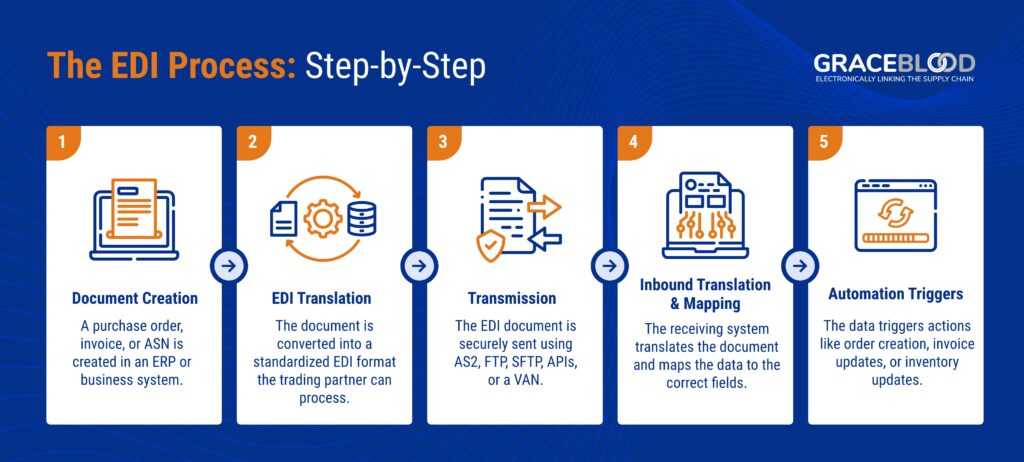
Document Creation
Every EDI transaction starts with the creation of a business document in a business system. This could for instance be a purchase order (PO), an invoice, an Advance Ship Notice (ASN), an order acknowledgment, or many other transactions commonly used between trading partners.
Typically, these documents are generated within an internal system such as an ERP, warehouse management system (WMS), or order processing software. In an automated EDI workflow, the generation of a document is often triggered by a specific business event. For example, a customer placing an order, stock falling below a threshold, or a shipment being prepared are all representative of events triggering an EDI workflow.
In most cases, the documents contain the critical information needed for the transaction, such as item quantities, delivery addresses, payment terms, and due dates.
EDI Translation
Once the document is created, it must be translated into a standard format that the trading partner can understand. North American EDI standards are developed and updated by the American National Standards Institute (ANSI) X12 committee. EDIFACT, the European standard, is developed and updated by the United Nations Economic Commission for Europe (UNECE). Regional standards such as ODETTE (automotive) and TRADACOMS (UK retail) follow similar standardization principles. This is where EDI translation software (whether cloud-based or in-house) comes into play.
The EDI software or EDI service provider converts the electronic document into an appropriate EDI format, using a transaction set and document code specific to the type of business transaction. For example:
- EDI 850 – Purchase Order
- EDI 810 – Invoice
- EDI 856 – Advance Ship Notice (ASN)
- EDI 997 – Functional Acknowledgment
This translation ensures that both the sender and receiver are using a universally recognized structure for the data, regardless of their internal systems.
Transmission
After translation, the EDI document is ready to be transmitted to the trading partner. Several communication protocols can be used to ensure the secure, reliable delivery of these documents, including:
Direct EDI Connections
- AS2 (Applicability Statement 2)
- FTP (File Transfer Protocol)
- SFTP (Secure File Transfer Protocol)
- APIs (Application Programming Interfaces)
Indirect EDI Connections
- Value-Added Networks (VANs)
These communication methods help ensure the data is encrypted, properly routed, and delivered to your business partners without tampering or loss — maintaining audit trails and authentication records for every transaction.
Inbound Translation & Mapping
Once the trading partner receives the EDI document, their system performs the reverse process: inbound translation and data mapping.
The incoming EDI file is translated from the standardized EDI format back into a format the partner’s internal system can read and process, such as XML or flat files. Even better, this process is often accomplished inbound and outbound using APIs in modern business systems. This mapping aligns the fields in the EDI document (e.g., item number, price, shipping address) with the corresponding fields in the partner’s enterprise resource planning system (ERP) or other business application.
No one has to manually enter the data—it flows automatically from one system to another, which is the key to realizing your return on investment.
Automation Triggers
One of the biggest benefits of EDI is its ability to trigger automated workflows. Once the document is mapped and ingested, the receiving system subsequently takes immediate action based on the EDI data.
For example:
- A purchase order triggers the creation of a sales order.
- An invoice updates accounts receivable and sends an acknowledgment.
- An ASN updates warehouse inventory and notifies the shipping team.
Finally, these automation triggers reduce delays, prevent manual errors, and ensure transactions are completed faster and with greater accuracy.
Communication Methods for EDI Transactions
EDI is only as effective as the method used to transmit the documents. So let’s explore the most common communication methods and their use cases.
Point-to-Point EDI
Direct or point-to-point EDI connects two trading partners directly without an intermediary. Each partner sets up a secure connection, typically via protocols such as AS2, to exchange documents in real-time.
Advantages:
- Faster EDI message exchange
- Full control over data transmission
- Ideal for high-volume or strategic trading relationships
However, managing many direct connections can become complex if a business has a large number of partners.
EDI via VAN (Value-Added Network)
Unlike direction connections, a Value-Added Network (VAN) acts as an intermediary that securely transmits EDI documents between trading partners. The VAN receives the file, validates it, and routes it to the appropriate recipient.
Benefits of using a VAN:
- Simplifies partner onboarding and management
- Ensures compliance with partner-specific requirements
- Offers tracking, auditing, and data archival services
Many organizations prefer VANs because they eliminate the need to manage multiple direct connections and provide additional reliability and security.
EDI via AS2
AS2 (Applicability Statement 2) is a widely used protocol for secure, real-time data transmission over the internet. It encrypts and signs messages to ensure both privacy and authenticity.
AS2 is commonly used in industries with high data security requirements, such as:
- Healthcare (HIPAA compliance)
- Retail (Walmart and other large retailers)
- E-commerce platforms (Amazon, eBay)
Lastly, AS2 provides end-to-end encryption, digital certificates, and message receipts to confirm delivery.
EDI via FTP/SFTP
FTP and SFTP are file transfer protocols used for moving EDI documents in batch mode. These methods are often used in legacy systems or by companies that exchange documents in scheduled batches rather than in real-time. Admittedly, some businesses use this method simply because their trading partner prefers or even requires it.
While not as secure or modern as AS2 or APIs, SFTP adds a layer of encryption over FTP, making it a safer option for data transfers.
How GraceBlood Can Help with EDI Implementation
Implementing EDI isn’t just about choosing the right software or protocol. Rather, it’s about building a solution that fits your business processes, trading partner requirements, and long-term goals. This is where GraceBlood comes in.
At GraceBlood, unlike our competitors, we specialize in EDI integration and automation for businesses of all sizes. Whether you’re new to EDI or looking to upgrade your legacy system, our managed EDI service takes the complexity out of implementation.
We help you:
- Map and translate documents to and from your internal systems
- Connect securely with trading partners via AS2, VAN, SFTP, or API
- Set up automation triggers to streamline order processing and fulfillment
- Ensure compliance with partner-specific EDI requirements
- Monitor document flow with 24/7 support and proactive issue resolution
Let our expert team handle the technical heavy lifting, so you can focus on running your business efficiently. With our EDI solutions, you can reduce costs, eliminate manual errors, and accelerate transaction cycles—without investing in internal IT resources.
Using EDI Effectively Ensures You’re Future
Ready
Electronic Data Interchange (EDI) has revolutionized the way businesses communicate. By automating the exchange of key documents and eliminating manual processes, EDI improves accuracy, reduces costs, and enhances the speed of supply chain operations.
Understanding how electronic data interchange works—from document creation and translation to secure transmission and automation—empowers businesses to fully leverage its capabilities. Whether you’re managing thousands of orders or just getting started, EDI offers a scalable and future-ready way to exchange data.
If you’re ready to simplify your business communications and streamline operations, GraceBlood is here to help. Our EDI experts are committed to delivering tailored, efficient, and compliant solutions that help your business grow.
Get Started with the Right EDI Solution for Your Business Today
Frequently Asked Questions
1. How does Electronic Data Interchange work?
Electronic data interchange works by automating the exchange of standardized business documents between trading partner systems without human intervention. The process follows five core steps:
- A business document — such as a purchase order, invoice, or advance ship notice — is created within an internal system like an ERP or warehouse management system (WMS).
- EDI translation software converts that document into a standardized format (such as ANSI X12 in North America or EDIFACT in Europe) that the receiving partner’s system can interpret.
- The translated document is transmitted to the trading partner via a secure communication protocol — AS2 (Applicability Statement 2), SFTP, FTP, API, or a value-added network (VAN).
- The receiving system translates the incoming EDI file back into its own internal format and maps the data fields to the appropriate fields in its ERP or other business application.
- The mapped data triggers automated workflows — a purchase order creates a sales order, an invoice updates accounts receivable, an ASN notifies the warehouse team. What’s more, the entire process happens automatically, with no manual data entry required at any stage.
2. What is the EDI process step-by-step?
The EDI process consists of five sequential steps:
- Document Creation: A business document is generated within an internal system — such as an ERP, warehouse management system (WMS), or order processing platform — typically triggered by a business event like a customer placing an order or a shipment being prepared.
- EDI Translation: EDI translation software converts the internal document into a standardized EDI format. In North America, the American National Standards Institute (ANSI) X12 standard governs transaction sets such as the EDI 850 (Purchase Order), EDI 810 (Invoice), EDI 856 (Advance Ship Notice), and EDI 997 (Functional Acknowledgment). In Europe and globally, EDIFACT is the dominant standard.
- Transmission: The translated EDI document is transmitted to the trading partner using secure communication protocols — AS2, SFTP, FTP, or through a value-added network (VAN) intermediary — maintaining audit trails and authentication records throughout.
- Inbound Translation and Mapping: The receiving trading partner’s system translates the incoming EDI file back into a readable format (such as XML, JSON, or flat files) and maps the data fields to the corresponding fields in their enterprise resource planning (ERP) or other business system.
- Automation Triggers: Once mapped and ingested, the data triggers automated workflows — purchase orders create sales orders, invoices update accounts receivable, and ASNs notify warehouse and shipping teams — completing the transaction cycle without manual intervention.
3. What are the four major components of EDI?
The four major components of an EDI system are:
- EDI Standards: Standardized formats that define how business documents are structured so trading partners can interpret them consistently. The most widely used standards are ANSI X12 (North America), EDIFACT (Europe and globally), ODETTE (European automotive industry), and TRADACOMS (UK retail).
- EDI Translation Software: Software that converts internal business data into the standardized EDI format for outbound transactions and reverses the process for inbound transactions. This can be cloud-based or on-premise and is the engine that makes automated document exchange possible.
- Communication Protocols: The secure channels used to transmit EDI documents between trading partners. Common protocols include AS2 (Applicability Statement 2) for real-time secure transmission, SFTP (Secure File Transfer Protocol) for batch transfers, FTP, and APIs for modern system-to-system connectivity. Lastly, value-added networks (VANs) provide an indirect transmission option that simplifies partner connectivity.
- ERP/Business System Integration: The connection between the EDI platform and the company’s internal systems — such as enterprise resource planning (ERP), warehouse management system (WMS), or order management platforms — that enables EDI data to flow automatically into business workflows without manual data entry.
4. Is EDI the same as API?
No — EDI and APIs are not the same, though they can be used together in modern supply chain environments. Electronic data interchange uses standardized, structured document formats (such as ANSI X12 and EDIFACT) to exchange business documents between trading partners. It was designed for B2B transactions at scale. More importantly, it’s required by major retailers like Walmart, Target, and Amazon as a condition of doing business. APIs (Application Programming Interfaces) enable real-time, flexible data exchange between systems using modern protocols and formats like REST and JSON.
APIs are highly effective for internal system-to-system connectivity — connecting an ERP to a WMS, for example. However, they are not a universal replacement for EDI in external trading partner environments. Each company’s API is proprietary, making large-scale adoption impractical for retailers managing thousands of suppliers. Most modern supply chains use both: EDI for external trading partner communications and APIs for internal integrations, with an EDI orchestration layer translating between the two as needed.
5. What is EDI integration?
EDI integration is the process of connecting an EDI platform to a company’s internal business systems. This can include an enterprise resource planning (ERP) system, warehouse management system (WMS), or order management platform. And it allows EDI transactions flow automatically into internal workflows without manual data entry. A well-integrated EDI environment means that when a trading partner sends a purchase order (EDI 850), it automatically creates a sales order in the ERP; when an invoice (EDI 810) is received, it automatically updates accounts receivable; and when an advance ship notice (EDI 856) arrives, it automatically notifies the warehouse team and updates inventory.
EDI integration can be achieved through direct API connections to cloud ERP systems, pre-built connectors for specific ERP platforms, or middleware translation layers that convert EDI formats into the data structure the ERP requires. Furthermore, the quality of EDI integration directly determines how much manual intervention is needed — and how much ROI the EDI investment delivers.
6. How does Electronic Data Interchange improve business efficiency?
Electronic data interchange improves business efficiency in five measurable ways:
Error Reduction: By replacing manual data entry with automated document exchange, EDI eliminates transcription errors that cause order discrepancies, invoice disputes, and chargeback penalties. Standardized formats ensure data is interpreted consistently across all trading partner systems.
Faster Transaction Processing: EDI documents are transmitted and processed almost instantly — accelerating order-to-cash and procure-to-pay cycles compared to paper-based or email-based processes. Purchase orders, invoices, and advance ship notices that once took days to process manually are completed in minutes.
Cost Savings: EDI reduces printing, postage, storage, and manual labor costs associated with paper-based document processing. Some cost estimates place manual order entry as high as $10 per order — costs that EDI automation eliminates at scale.
Supply Chain Management Visibility: Real-time EDI data exchange provides visibility into order status, shipment confirmations, and invoice processing across the entire supply chain, enabling proactive decision-making rather than reactive firefighting.
Scalability: EDI systems handle high transaction volumes without proportional increases in headcount or operational complexity, supporting business growth without creating new bottlenecks in order processing or fulfillment workflows.